
Upon submission of a Turkey visa application, diligently monitoring the application’s status is imperative. Maintaining consistent awareness regarding your visa application’s progress ensures preparedness and facilitates smooth progression toward your travel plans. Our VisaFast Turkey visa status tracking tool streamlines this process, eliminating unnecessary complications.
By inputting essential information, you can perform a Turkey e-visa status check online in approximately 2 minutes.
Checking Your Turkey E-Visa Status Online
To monitor the status of your Turkish e-visa application, utilize the VisaFast tool by following these instructions:
Step 1: Input Necessary Information
Enter the provided reference number along with the email address indicated during your original visa application submission.
Step 2: Initiate Status Check
Click the ‘Check Status’ button. Possible results include:
Approved: This indicates that your Turkey e-visa application has been successfully approved.
Rejected: This confirms that your application has been denied.
In Process: Your e-visa application is currently undergoing the approval procedure.
Unknown: The data provided is not recognized; please verify for accuracy.
Advantages of Utilizing the VisaFast Turkey Visa Status Tracking Tool
- VisaFast sources information directly from the Turkish immigration authorities, delivering 100% precise and instantaneous updates regarding visa statuses.
- This tool enables users to monitor their visa application progress at any time and from any location, via their smartphone or desktop computer.
- Employing sophisticated technological safeguards, VisaFast guarantees data security and restricts unauthorized access to applicant information.
What Happens After My Turkey e-Visa is Approved?
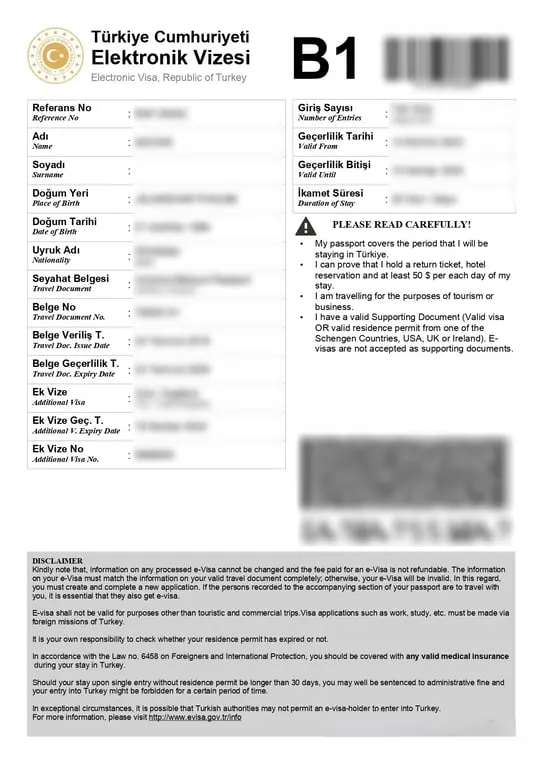
Following approval, the Turkish Directorate General of Migration Management will transmit an email detailing the visa approval. This email will additionally provide the hyperlink required to access and download the Turkey e-visa in Portable Document Format (PDF).
The Turkey e-visa will be presented as follows:
My Turkey e-visa status shows “rejected.” What should I do?
If your Turkey visa application status shows “rejected,” understand and address the reasons for rejection before reapplying.
Some of the common Turkey e-visa rejection reasons include the following:
Incomplete or inaccurate application: Missing or mismatching information on your visa and travel documents can often lead to visa rejection.
Invalid passport: Having a passport with a validity of less than at least 60 days beyond the ‘duration of stay’ of your Turkey e-visa can cause a rejection.
Incorrect photographs: Submitting photos that do not meet the visa photo requirements (e.g., must be clear, unedited, and not older than 6 months) can cause issues.
Invalid supporting documents: Depending on your nationality, you might be required to provide hotel reservations, flight tickets, or a valid visa or residence permit from one of the Schengen Countries, the USA, UK, or Ireland. If the provided supporting document is invalid or fake, your e-visa application will be automatically rejected.
Worried about another visa rejection? Apply with VisaFast, and let our experts ensure that nothing stops you from getting a Turkey e-visa this time!
Can I check my Turkey visa application status on the VisaFast tool for free?
Yes, applicants for Turkish visas may monitor the progress of their applications utilizing the VisaFast status tracker, which is available at no cost.
What information do I need to check the Turkey e-visa status online?
To ascertain the status of your Turkey e-visa application, please utilize the VisaFast tool, providing solely the application reference number and associated email address.
Can I check the Turkey e-visa status on the government website?
Yes, you can monitor the status of your Turkey e-visa application through the following steps:
Navigate to the official Republic of Turkiye e-visa website.
Select ‘Ongoing Application’ located within the Application section at the bottom of the homepage.
Input your passport number, application reference number, and registered email address.
Complete the Captcha verification and click ‘Continue’ to view the application’s status update.
I have applied through the government website. Can I check my Turkey e-visa status using the VisaFast tool?
Yes, it is possible to monitor the status of your visa application utilizing the VisaFast Turkey visa status tracker, regardless of whether your application was submitted via the official government channels.
Can I check the Turkey visa status online using my passport number?
Note: Verification of a Turkey visa application is dependent on providing the passport number alongside the corresponding reference number and associated email address. Sole reliance on the passport number will not suffice for tracking status updates.
My Turkey e-visa status is still showing "in process." What can I do?
If your Turkey e-visa status is currently displayed as “in process,” it could indicate one of the following circumstances:
Within the Standard Processing Timeline: Turkey e-visa applications are typically processed within 48 hours following submission. Therefore, a status of “in process” is a common occurrence during this window.
Potential Processing Delays: Should the status persist after the expected 48-hour timeframe, review your email’s spam or junk folder for any updates. If no communications are detected, it is necessary to contact the e-visa support team for the application platform through which you submitted your application for assistance.