
You’ve filled out the form, double-checked your documents, and everything’s going smoothly, until it’s time to upload your photo. Suddenly, you’re wondering if the selfie from your last trip will cut it. Is the background plain enough? Is your head centred? Does it even meet the size requirements?
Instead of stressing or hunting down a photo studio, you can take care of it in minutes from your phone or laptop, with the VisaFast Taiwan Visa Photo Maker Tool. Here’s how to use it:
Utilizing the VisaFast Taiwan Visa Photo Tool
Seeking to apply for a Taiwan visa? The following instructions detail how to efficiently produce a compliant visa photo:
-
Photograph Upload: Please upload a current photograph from your device, utilizing a JPEG or PNG file format. Alternatively, you may capture an image using your mobile device’s camera.
-
Adjustments and Formatting: Engage the ‘Transform’ function. The application will automatically adjust, crop, centralize, and format your photo according to specific Taiwan visa specifications.
-
Download and Application Usage: Download the generated photograph and integrate it into your visa application or passport documents – whether in a digital or printed format.
VisaFast provides comprehensive support for the entire Taiwan visa application journey, simplifying the process and ensuring a streamlined experience from commencement to completion.
Taiwan Visa Photograph Specifications
The following specifications for Taiwan visa photographs are issued by the Bureau of Consular Affairs:
-
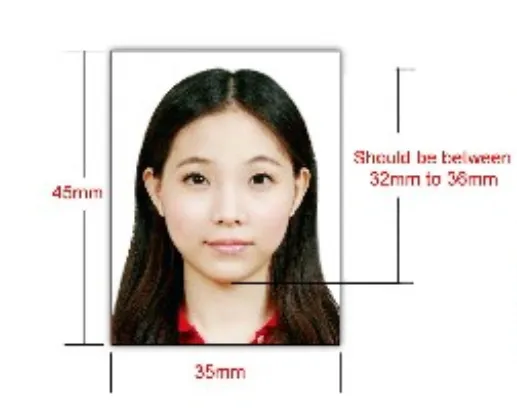
Dimensions: 45 mm in height x 35 mm in width.
-
Head Size: The frontal dimension of the face should range from 32 mm to 36 mm, occupying approximately 70–80% of the total image area.
-
Photo Expiry: Photographs must have been taken within the preceding 6 months period.
-
Background: The image background must be a solid, neutral white colour.
-
Expression: Applicants must present a neutral facial expression with a completely closed mouth and open eyes.
-
Face Alignment: The head must be precisely centered and oriented directly towards the camera.
-
File Format & Technical Details: Digital submissions must be in full-colour, utilizing the JPEG or JPG format. Files must be RGB, 24-bit, and should not exceed a maximum file size of 5 MB.
-
Optical Correction: The use of glasses is permitted provided that there are no visible glare, coloured tints, or substantial frames that obscure the eyes.
-
Head Coverings: Headwear is solely permitted due to recognised religious or medical factors, ensuring that the entire face is clearly visible.
-
Image Quality: Photographs must demonstrate superior quality through eliminating red-eye effects, noticeable shadows, unwanted ink markings, creases, and unauthorized retouching.
-
Accessories: Colored or circular contact lenses are not acceptable.
-
Minimum Resolution: The minimum acceptable image resolution is 3 megapixels.
Taiwan Visa Photograph Specifications
All photographs submitted for a Taiwan visa application must conform to the following dimensions and specifications. The image requirements specify a photograph size of 45 mm by 35 mm, ensuring the full head and shoulders are visible. The facial area must occupy 70-80% of the total picture frame, with a head size ranging from 32 mm to 36 mm.
Taiwan Visa Photograph Specifications
All digital images presented as part of a Taiwan visa application must adhere to the following requirements: images must be saved in either JPEG or JPG format, utilizing the RGB color mode with a resolution of at least 531 pixels in width and 413 pixels in height, and the file size must not exceed 5 Megabytes.
Taiwan Visa Photograph Requirements
The photograph background shall be a solid, white surface illuminated by consistent and even lighting. The background must be free of shadows, patterns, or any distracting elements. Mixed or outdoor lighting is not permitted.
Face Size & Positioning
Your face should be centred and visible, with both sides of the face and full facial features shown. There should be no tilt, and your eyes must be horizontally aligned.
Borderless Photo Requirement
The photograph supplied must not contain any borders, frames, or other visual edging.
Recent Photo Requirements
Your photograph must have been taken within the preceding 6 months and must faithfully reflect your current physical appearance.
Photo Quality & Clarity
Photos must be sharp, high-resolution, and free from blur, overexposure, or digital edits. They will be rejected with poor lighting, pixelation, or colour issues.
Head Position and Facial Expression
Maintain direct eye contact with the camera while ensuring your head is held upright. Your facial expression should be neutral, with your mouth closed and eyes open. Avoid any smiling, frowning, or exaggerated gestures.
Headgear and Eyewear Requirements
-
Eyewear: Visible eyewear is permitted provided it does not obstruct the applicant’s vision or introduce significant glare. Avoid frames with excessive thickness.
-
Headgear: Head coverings are permissible solely when necessitated by bona fide religious convictions or certified medical conditions. The applicant’s facial features – from the chin to the forehead – must remain fully visible at all times.
Taiwan Children’s Visa Photo Specifications
- The photograph must depict the child as a solo subject. The presence of hands, toys, or chairs should not be visible.
- Both the face and shoulders of the child must be fully framed within the image.
- A neutral or peaceful facial expression is generally preferred.
- The child’s eyes must be fully open; however, this requirement is waived for infants.
- Appropriate background and lighting conditions consistent with adult visa photographs are mandatory.
Do’s & Don’ts of Taiwan Visa Photos
Do:
-
Use a plain white background
-
Maintain a neutral expression
-
Ensure the face is fully visible and centred
-
Use even, shadow-free lighting
-
Keep the photo recent and unedited
Don’t:
-
Don’t smile, tilt your head, or squint
-
Don’t wear hats, headbands, or fashion accessories
-
Don’t use digital filters or enhancements
-
Don’t wear colored contact lenses
-
Don’t submit blurry, dark, or poorly printed photos
Can I take a photo with my phone and still use the tool?
Yes, a digital photograph submitted in accordance with this program accepts clear, adequately illuminated images set against a neutral background. The system will adjust your photograph to fulfill Taiwan’s visa application specifications.
Does the tool automatically crop and resize the photo?
Yes! To comply with Taiwan’s visa requirements, please upload your photograph. The system will automatically adjust the image’s cropping, centering, and sizing to conform to the nation’s specified dimensions and technical specifications.
Can I wear glasses in my photo?
Yes, however, it is recommended to avoid wearing glasses during the photography process. Optical considerations, such as glare or tinted lenses with a thick frame, should be avoided. For clarity, it is advised to proceed with photographic capture without eyewear if there is any uncertainty regarding their potential impact on image quality.</
Does the tool remove the background?
Yes, this tool adjusts or cleans the background to correspond with the demand for a fully white backdrop. It is essential to confirm that the originating background does not contain excessive clutter or a dark tint.