
To monitor the status of your Cambodian visa application, utilize the VisaFast Cambodia visa status tracking tool. This resource allows you to receive timely updates and facilitates preparation for your journey.
Furthermore, you can access Cambodia visa status online via the VisaFast tool, irrespective of your nationality, and at any time.
How to Verify Your Cambodia e-Visa Status Online?
To check the status of your Cambodia e-visa application, follow these steps:
Step 1: Provide your reference number and the email address registered when submitting your application.
Step 2: Click on the ‘Check Status’ button to access your e-visa application details. The following statuses may be shown:
Approved: This indicates your Cambodia e-visa has been successfully authorized.
In Process: This denotes that your e-visa application is currently under review by the Cambodian visa authorities.
Rejected: Your e-visa application has been denied by the Cambodian visa authorities.
Unknown: The entered reference number or email address cannot be matched with existing records.
How to check Cambodia visa status using a passport number?
Visit the official government website
Enter your passport number and primary email used for applying for the visa.
Click on submit to learn your visa status.
Benefits of Utilizing the VisaFast Cambodia Visa Status Tracking System
VisaFast leverages partnerships with Cambodian immigration officials to deliver consistently precise, current visa status information.
The system enables convenient Cambodia e-visa tracking at any time and location, utilizing either a smartphone or laptop device.
Implementing sophisticated technological safeguards facilitates robust data protection and inhibits unauthorized access to information.
How will I receive my Cambodia visa once it is approved?
Once your visa application is approved, you will receive an email with the Cambodia e-visa attached. It will be in a downloadable PDF format, containing important information like your name, nationality, visa type and validity, among others.
Here is what the Cambodia e-visa looks like:
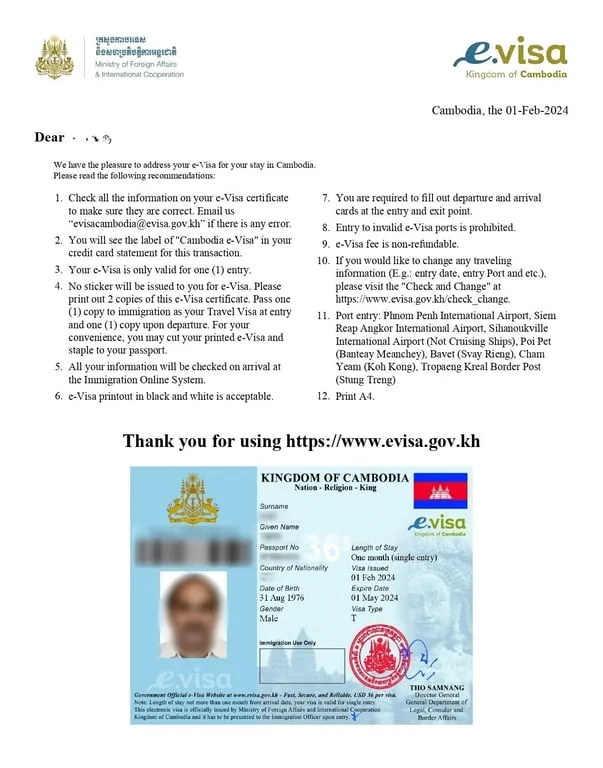
Tip: Upon receiving the e-visa, ensure you check all the information. If there are discrepancies, you must immediately contact the e-visa channel through which you applied.
Cambodia e-Visa Rejection – Next Steps
If your application for a Cambodia e-visa is denied, you may reapply following a review of the specific grounds for rejection.
The following represent frequently cited reasons for Cambodia visa denials:
Insufficiently Complete or Accurate Application Details: Providing inaccurate or inconsistent information within your e-visa application is grounds for rejection.
Passport Validity Issues: Your passport must be valid for at least 6 months days from the date of your intended entry into Cambodia. Individuals whose passports are nearing expiration dates should initiate the renewal process prior to submitting another application.
Non-Compliant Photograph: Visa photographs must adhere to stipulated requirements, notably clarity and not exceeding 6 months in age. Submissions that do not precisely align with these guidelines may result in denial.
Utilizing Untrustworthy Supporting Documentation: Substantiating your application with counterfeit travel documents, including false flight reservations or hotel confirmations, is prohibited under established procedures, potentially rendering the passport rejection. Employing visa application service partners requires the selection of legitimate entities whose documentation can provide verifiable assistance.
Concerned about potentially incurring additional visa application refusal? Apply using VisaFast, trusting our specialized support team to eliminate any chance of application problems.
What information do I need to track my Cambodia visa status online?
To verify your Cambodia visa status online, please provide your application reference number and the email address you submitted with your application.
I have lost the reference number of the Cambodia visa application. What can I do?
To locate your Cambodia visa reference number, please proceed as follows:
Visit the official Cambodia e-visa website.
Provide your passport number and the email address utilized during the application submission.
Upon pressing ‘Submit,’ your reference number will be displayed.
Can I track the status of my Cambodia visa offline?
No, currently, it is impossible to monitor the status of your Cambodian e-visa offline. The application process is exclusively conducted online through the management of the Ministry of Foreign Affairs and International Cooperation. Embassy and consulate offices do not participate in processing e-visa applications for Cambodia.
My Cambodia visa status is still showing "in process." What can I do?
If your Cambodia visa status persists as “in process,” the following situations may be occurring:
Within the Standard Processing Timeline: Cambodia visa applications typically take approximately 3 business days to process following submission. Therefore, it is common for the status to remain “in process” during this timeframe.
Delayed Processing: If the status does not update after the standard processing window has elapsed, review your email’s spam or junk folder for any notifications. If no updates are received, contact the e-visa support team of the platform via which your application was submitted.
Can I change the travel information after receiving my Cambodia e-visa?
Yes, to modify your travel details—including the arrival port or travel dates—for your Cambodia e-visa, undertake the following procedure:
Proceed to the official Cambodia e-visa website.
Select the ‘Check & Change’ option available on the homepage.
Input your application reference number and the email address utilized during the initial application.
Click ‘Submit’ to initiate the update process for your travel information.