

Sri Lanka ETA for Indians
Sri Lanka Visa Information
Visa Type:
E-Visa
Visa Type: E-VisaYou will have to take a print-out of your E-visa and present it at the immigration counter.
Length of Stay:
30 days
Length of Stay: 30 daysThe maximum duration that you are allowed to remain in a country after entering with that particular visa.
Validity:
180 days
Validity: 180 daysThe number of days your visa is active after the date of issuance. We ensure your visa is valid based on your travel dates.
Entry:
Single
Entry: SingleYou can enter the country only once during the visa's validity period and cannot re-enter using the same visa once you've exited.
Method:
Paperless
Method: PaperlessApply and receive your visa fully online. No paperwork needed.
Sri Lanka Visa Rejection Reasons
Factors that can get your visa rejected
Expired Passport
Applying with a passport that has expired or expires within 6 months
Insufficient Funds
Failing to demonstrate enough financial resources to support your stay.
Criminal Record
Having a criminal history that disqualifies you from obtaining a visa.
Previous Visa Violations
Having overstayed or violated the terms of a previous visa.
Frequently Asked Questions
Do Indians need eta for Sri Lanka?
Yes, Indian nationals require an Electronic Travel Authorization (ETA) for travel to Sri Lanka for tourism purposes. The ETA authorizes a stay in Sri Lanka for a period of 30 days, and is obtainable through an online application process, eliminating the need to visit the Sri Lankan embassy or consulate.
Important Information: Multiple entries into Sri Lanka are permitted, commencing from the date of initial arrival, and extending for a duration of 30 days.
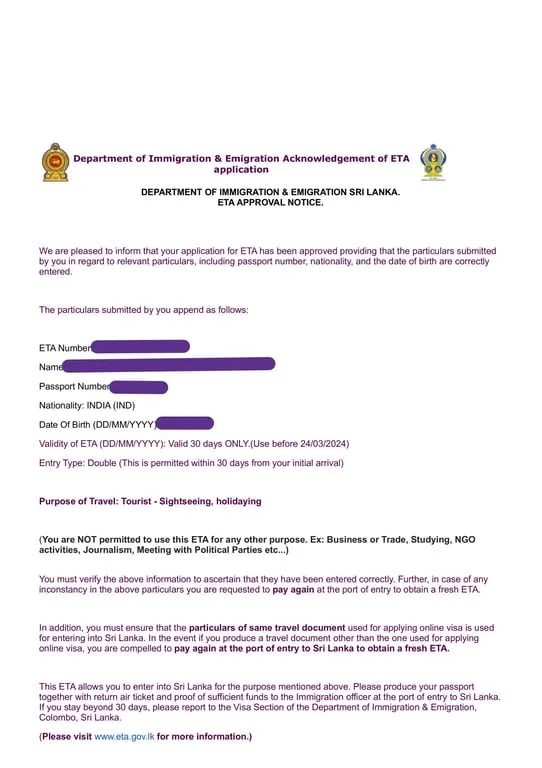
What does the Sri Lanka ETA look like?
Here is the sample of Sri Lanka ETA:
Can I apply for a new ETA if I already have a Sri Lanka ETA?
No. A new ETA cannot be obtained using the same passport until the current ETA expires.
Why choose VisaFast for your Sri Lanka ETA application?
VisaFast guarantees the prompt submission of your ETA application, as stated. Selecting VisaFast as your visa service provider offers several key advantages:
Simplified Application Procedure: VisaFast streamlines the ETA application, reducing the time and resources required.
Intuitive Platform Design: The platform is developed with an easy-to-use design to facilitate a smooth and uncomplicated application experience.
Secure Data Management: Your personal information is handled according to rigorous security and confidentiality protocols.
Are Indians eligible for visa on arrival for Sri Lanka?
No, Indian nationals are ineligible for visa on arrival in Sri Lanka. To enter Sri Lanka for tourism, Indian passport holders must obtain an ETA (Electronic Travel Authorisation) prior to travel.
Does children need separate ETA?
Yes, children under 16 years of age should have an ETA before entering Sri Lanka.
What are the Sri Lanka ETA requirements for Indians?
To finalize your online application for a Sri Lanka Electronic Travel Authorisation (ETA), you must provide the following:
- Passport: Your passport must be valid for a minimum of six months from your intended date of arrival in Sri Lanka to facilitate the ETA application process.
Important: Ensure that all passport details, including the passport number, date of birth, and nationality, are accurately transcribed to match those appearing on your official travel documents.
Do I need a confirmed flight ticket before I apply for a Sri Lanka ETA?
No. You don’t need a flight booking to apply for an ETA.
How can I avoid getting my Sri Lanka ETA rejected?
The following factors may lead to the rejection of your Sri Lanka ETA application, and it’s crucial to understand and address them. Common grounds for rejection include:
Passport Validity: Your passport must be valid for a minimum of six months beyond the intended duration of your stay.
Prior Immigration Concerns: Any history of previous immigration violations must be disclosed and explained clearly.
Application Completeness: The ETA application form must be fully and accurately completed.
Can I make the correction to my Sri Lanka ETA application?
No. Once submitted, the application cannot be cancelled. Ensure all details are correct before confirmation. If errors are found later, you must reapply.
Do I need any vaccinations to enter Sri Lanka?
No. You do not require any vaccinations to enter Sri Lanka.
What are the Sri Lanka entry requirements for Indians?
Here are the Sri Lanka entry requirements for Indian applicants:
- Valid Passport
- Electronic Travel Authorization (ETA)
- Return flight tickets
- Evidence of adequate financial resources
Can I work in Sri Lanka with ETA?
No, you cannot engage in any form of employment (paid or unpaid) during your period of stay in Sri Lanka on an ETA.
Can I extend my Sri Lanka ETA?
Individuals intending to remain in Sri Lanka beyond 30 days are required to apply for a visa extension. An initial short-term visit visa may be extended for a maximum period of 270 days, typically processed in three installments: 30 days upon arrival, 60 days to cover the first extension period, and 90 days for subsequent extension requests.
How to apply for a Sri Lanka ETA for Indians?
To initiate your ETA application using VisaFast, please follow these steps:
Access VisaFast: Begin your application process at VisaFast.
Document Submission: Upload a scan or image of your passport, specifically the front page and the last page.
Application Review: Thoroughly review your completed application and implement any necessary corrections.
Fee Payment: If a fee is applicable, complete the payment for the ETA fee and finalize the transaction.
Confirmation: Upon approval, you will be issued an ETA.
Important: We recommend printing a copy of the ETA prior to traveling to Sri Lanka and retaining a duplicate for your records.
Should I take Sri Lanka ETA visa print?
Yes, you should take the printout of your Sri Lanka ETA and show it at the immigration.
How to track Sri Lanka eta status for Indians
To monitor the status of your Sri Lanka Electronic Travel Authorization (ETA), access the VisaFast dashboard and navigate to the “My Profile” section.